醉梦轩

醉中无日月,梦里有乾坤

###1、下载openssl源码

https://www.openssl.org/source/

###2、安装环境

  1. vs2010
  2. ActivePerl
  3. nasm(将nasm.exe所在目录加入到%PATH%中)

###3、编译

  1. 进入Visual Studio 命令提示(2010)
  2. 进入源码目录
  3. 执行perl Configure VC-WIN32 --prefix=C:\Build-OpenSSL-VC-32
  4. 执行set path=C:\Program Files (x86)\Microsoft SDKs\Windows\v7.0A\bin;%PATH%
  5. 执行set INCLUDE=C:\Program Files (x86)\Microsoft SDKs\Windows\v7.0A\Include;C:\Program Files (x86)\Microsoft Visual Studio 10.0\VC\include
  6. 执行set lib=C:\Program Files (x86)\Microsoft SDKs\Windows\v7.0A\Lib;C:\Program Files (x86)\Microsoft Visual Studio 10.0\VC\lib
  7. 执行nmake

今天,介绍一种在主题中添加Google Prettify代码高亮的方法。这里以next主题为例,如果对应的目录不存在,可以手动创建,或选择其它目录。

1、 将压缩包https://raw.githubusercontent.com/google/code-prettify/master/distrib/prettify-small.zip下载到本地,解压到主题的lib目录下,目录名为prettify。
2、 从http://jmblog.github.io/color-themes-for-google-code-prettify/下载自己喜欢的主题文件到lib/prettify/skins目录下。
3、 在主题的layout/_third-party目录下创建prettify.swig文件,内容如下:

1
2
3
4
5
6
7
8
9
<link rel="stylesheet" href="/lib/prettify/skins/{{ theme.custom_highlight_theme }}.css" type="text/css">
<script src="/lib/prettify/prettify.js" type="text/javascript"></script>
<script type="text/javascript">
$(document).ready(function() {
$('pre').addClass('prettyprint linenums').attr('style', 'overflow:auto;');
prettyPrint();
});
</script>

4、 修改主题layout目录下的_layout.swig文件(只要是会被所有文件加载的地方都可以),在合适的地方(最好是最后)添加:

1
{% include '_third-party/prettify.swig' %}

5、 修改主题的_config.yml文件,添加一行:

1
custom_highlight_theme: theme_name

theme_name是要使用主题名,也就是下载的css文件名。本来想复用next中自带的highlight_theme字段,但是改成其它主题名字后运行hexo会报错,只好新建了一个字段。

参考链接:

https://liuzhichao.com/2016/hexo-use-prettify-to-highlight-code.html

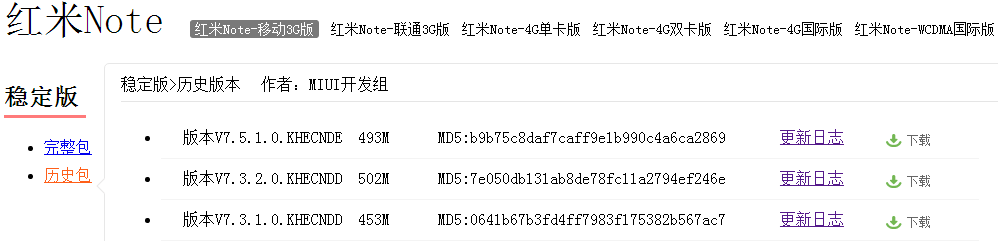
miui网站提供了所有小米手机的卡刷包下载链接,但是默认只有最新的3个版本。如果我要下载旧点的版本(比如现在是miui8,但是我想下miui7),一般会在论坛里搜索,但如果论坛里也搜索不到怎么办呢?
这个时候我们会借助于历史页面网站,因为虽然页面更新了,但是旧版本的下载链接还是有效的。

1、 打开网站: http://web.archive.org/

2、 在搜索框中输入要查看的页面url,比如红米Note的miui下载页面:http://www.miui.com/download-218.html。然后,页面会显示所有收录的历史记录。

3、 选择某一天的版本进去,发现有7.0的rom了

4、点击下载,由于此时的链接地址是被web.archive.org处理过的:

http://web.archive.org/web/20161118214831/http://bigota.d.miui.com/V7.5.1.0.KHECNDE/miui_HMNoteTD_V7.5.1.0.KHECNDE_b9b75c8daf_4.4.zip

如果不能直接下载,只要去掉前面的http://web.archive.org/web/20161118214831/即可。

Python中可以使用

python setup.py build -c mingw32 install

安装包含C++扩展的第三方库,但需要先安装MinGW 5.1.4及以后版本,并将C:\MinGW\bin目录加入到环境变量。

安装过程中可能会出现以下错误:

  • gcc: error: unrecognized command line option ‘-mno-cygwin’
    解决方法:修改C:\Python27\Lib\distutils\cygwinccompiler.py文件,去掉里面出现的-mno-cygwin

  • undefined reference to ‘_imp__PyExc_TypeError’
    解决方法:

  1. 在MinGW中安装pexports工具
  2. 执行命令 pexports C:\Windows\SysWOW64\python27.dll > python27.def,在当前目录下生成python27.def文件
  3. 执行命令 dlltool --dllname python27.dll --def python27.def --output-lib libpython27.a,在当前目录下生成libpython27.a文件,并移动到C:\Python27\libs目录中
  • 编译出的pyd无法加载

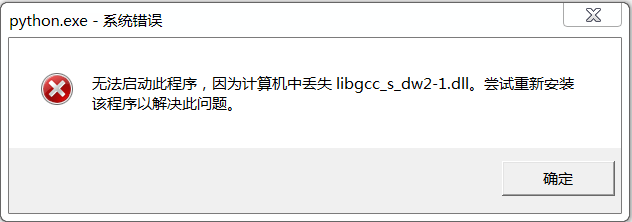
报错信息为:ImportError: DLL load failed: 找不到指定的模块。

运行ctypes.windll.kernel32.LoadLibraryA(pyd_path),报错如下:

解决方法如下:

修改文件C:\Python27\Lib\distutils\cygwinccompiler.py,类CygwinCCompiler的构造函数中使用了如下逻辑:

1
2
3
4
5
6
# ld_version >= "2.13" support -shared so use it instead of
# -mdll -static
if self.ld_version >= "2.13":
shared_option = "-shared"
else:
shared_option = "-mdll -static"

在高版本中默认使用了动态链接,强制改成静态链接,重新编译即可。

Android模拟器6.0版本进入系统时,桌面应用com.android.launcher3会发生随机Crash。

W/System.err( 1611): java.lang.IllegalArgumentException:
Wrong state class, expecting View State but received class
android.appwidget.AppWidgetHostView$ParcelableSparseArray instead.
This usually happens when two views of different type have the same id in the same hierarchy.
This view’s id is id/0x3. Make sure other views do not use the same id.

W/System.err( 1611): at android.view.View.onRestoreInstanceState(View.java:13772)
W/System.err( 1611): at android.widget.TextView.onRestoreInstanceState(TextView.java:3784)
W/System.err( 1611): at android.view.View.dispatchRestoreInstanceState(View.java:13748)
W/System.err( 1611): at android.view.ViewGroup.dispatchRestoreInstanceState(ViewGroup.java:2894)
W/System.err( 1611): at android.view.View.restoreHierarchyState(View.java:13726)
W/System.err( 1611): at com.android.internal.policy.impl.PhoneWindow.restoreHierarchyState(PhoneWindow.java:2009)
W/System.err( 1611): at android.app.Activity.onRestoreInstanceState(Activity.java:1074)
W/System.err( 1611): at com.android.launcher3.Launcher.onRestoreInstanceState(Launcher.java:2013)

网上找到如下解决方法:

packages/apps/Launcher3/src/com/android/launcher3/Launcher.java:

public void onRestoreInstanceState(Bundle state) {
    // Wrap the code block will throw runtinme exception in try / catch block
    // ----------------------------------------------------------------------
    //super.onRestoreInstanceState(state);
    //for (int page: mSynchronouslyBoundPages) {
    //    mWorkspace.restoreInstanceStateForChild(page);
    //}

    try {
        super.onRestoreInstanceState(state);
        for (int page: mSynchronouslyBoundPages) {
            mWorkspace.restoreInstanceStateForChild(page);
        }
    } catch (Exception e) {
        Log.e(TAG, "Exception in onRestoreInstanceState():");
        e.printStackTrace();
    }
}

编译后替换掉镜像中的文件:

/system/priv-app/Launcher3/Launcher3.apk
/system/priv-app/Launcher3/oat/x86/Launcher3.odex

重启后报了另外一个错误:

java.lang.RuntimeException: Unable to get provider com.android.launcher3.LauncherProvider: java.lang.ClassNotFoundException: Didn’t find class “com.android.launcher3.LauncherProvider” on path: DexPathList[[zip file “/system/priv-app/Launcher3/Launcher3.apk”],nativeLibraryDirectories=[/system/priv-app/Launcher3/lib/x86, /vendor/lib, /system/lib]]
at android.app.ActivityThread.installProvider(ActivityThread.java:5156)
at android.app.ActivityThread.installContentProviders(ActivityThread.java:4748)
at android.app.ActivityThread.handleBindApplication(ActivityThread.java:4688)
at android.app.ActivityThread.-wrap1(ActivityThread.java)
at android.app.ActivityThread$H.handleMessage(ActivityThread.java:1405)
at android.os.Handler.dispatchMessage(Handler.java:102)
at android.os.Looper.loop(Looper.java:148)
at android.app.ActivityThread.main(ActivityThread.java:5417)
at java.lang.reflect.Method.invoke(Native Method)
at com.android.internal.os.ZygoteInit$MethodAndArgsCaller.run(ZygoteInit.java:726)
at com.android.internal.os.ZygoteInit.main(ZygoteInit.java:616)
Caused by: java.lang.ClassNotFoundException: Didn’t find class “com.android.launcher3.LauncherProvider” on path: DexPathList[[zip file “/system/priv-app/Launcher3/Launcher3.apk”],nativeLibraryDirectories=[/system/priv-app/Launcher3/lib/x86, /vendor/lib, /system/lib]]
at dalvik.system.BaseDexClassLoader.findClass(BaseDexClassLoader.java:56)
at java.lang.ClassLoader.loadClass(ClassLoader.java:511)
at java.lang.ClassLoader.loadClass(ClassLoader.java:469)
at android.app.ActivityThread.installProvider(ActivityThread.java:5141)
… 10 more
Suppressed: java.io.IOException: No original dex files found for dex location /system/priv-app/Launcher3/Launcher3.apk
at dalvik.system.DexFile.openDexFileNative(Native Method)
at dalvik.system.DexFile.openDexFile(DexFile.java:295)
at dalvik.system.DexFile.(DexFile.java:80)
at dalvik.system.DexFile.(DexFile.java:59)
at dalvik.system.DexPathList.loadDexFile(DexPathList.java:279)
at dalvik.system.DexPathList.makePathElements(DexPathList.java:248)
at dalvik.system.DexPathList.(DexPathList.java:120)
at dalvik.system.BaseDexClassLoader.(BaseDexClassLoader.java:48)
at dalvik.system.PathClassLoader.(PathClassLoader.java:65)
at android.app.ApplicationLoaders.getClassLoader(ApplicationLoaders.java:58)
at android.app.LoadedApk.getClassLoader(LoadedApk.java:376)
at android.app.LoadedApk.makeApplication(LoadedApk.java:568)
at android.app.ActivityThread.handleBindApplication(ActivityThread.java:4680)
… 8 more

猜测是因为编译时用的art库版本与模拟器中不一致,导致生成的oat文件不匹配。解决方法是把dex文件拷贝到模拟器里,然后使用dex2oat编译下。

编译出来的dex文件(Launcher3.apk中不包含dex文件)路径是:

out/target/common/obj/APPS/Launcher3_intermediates/classes.dex

使用如下命令可以在/data/local/tmp目录下生成Launcher3.odex文件,/data/local/tmp/Launcher3.dex是要输入的dex文件路径。

5.0中执行的命令

> dex2oat --runtime-arg -Xms64m --runtime-arg -Xmx512m --dex-file=/data/local/tmp/Launcher3.dex --dex-location=/system/priv-app/Launcher3/Launcher3.apk --oat-file=/data/local/tmp/Launcher3.odex --android-root=/system --instruction-set=x86 --instruction-set-features=default --include-patch-information --runtime-arg -Xnorelocate --no-include-debug-symbols

6.0中执行的命令

> dex2oat --runtime-arg -Xms64m --runtime-arg -Xmx512m --dex-file=/data/local/tmp/Launcher3.dex --dex-location=/system/priv-app/Launcher3/Launcher3.apk --oat-file=/data/local/tmp/Launcher3.odex --android-root=/system --instruction-set=x86 --instruction-set-variant=x86 --instruction-set-features=default --include-patch-information --runtime-arg -Xnorelocate --no-generate-debug-info --abort-on-hard-verifier-error

另外一种解决方法是:
修改

build/target/board/generic_x86/BoardConfig.mk

文件,注释掉:

WITH_DEXPREOPT ?= true

这样,编译后的apk中就会包含dex文件,在模拟器第一次开机时会自动进行dexopt操作。

Proxychains是Linux上一款全局代理工具,通过Hook Socket函数实现透明代理,这和Windows上的Proxifier有点类似。
在Ubuntu上安装Proxychains的方法是:

apt-get install proxychains

安装的是3.1版本,配置文件的路径是:/etc/proxychains.conf,内容如下:

# proxychains.conf  VER 3.1
#
#        HTTP, SOCKS4, SOCKS5 tunneling proxifier with DNS.
#

# The option below identifies how the ProxyList is treated.
# only one option should be uncommented at time,
# otherwise the last appearing option will be accepted
#
#dynamic_chain
#
# Dynamic - Each connection will be done via chained proxies
# all proxies chained in the order as they appear in the list
# at least one proxy must be online to play in chain
# (dead proxies are skipped)
# otherwise EINTR is returned to the app
#
strict_chain
#
# Strict - Each connection will be done via chained proxies
# all proxies chained in the order as they appear in the list
# all proxies must be online to play in chain
# otherwise EINTR is returned to the app
#
#random_chain
#
# Random - Each connection will be done via random proxy
# (or proxy chain, see  chain_len) from the list.
# this option is good to test your IDS :)

# Make sense only if random_chain
#chain_len = 2

# Quiet mode (no output from library)
#quiet_mode

# Proxy DNS requests - no leak for DNS data
proxy_dns 

# Some timeouts in milliseconds
tcp_read_time_out 15000
tcp_connect_time_out 8000

# ProxyList format
#       type  host  port [user pass]
#       (values separated by 'tab' or 'blank')
#
#
#        Examples:
#
#               socks5  192.168.67.78   1080    lamer   secret
#               http    192.168.89.3    8080    justu   hidden
#               socks4  192.168.1.49    1080
#               http    192.168.39.93   8080
#
#
#       proxy types: http, socks4, socks5
#        ( auth types supported: "basic"-http  "user/pass"-socks )
#
[ProxyList]
# add proxy here ...
# meanwile
# defaults set to "tor"
socks4         127.0.0.1 9050

Proxychains支持HTTP(HTTP-Connect)、SOCKS4和SOCKS5三种类型的代理,需要注意的是:配置代理服务器只能使用ip地址,不能使用域名,否则会连不上。

Proxychains支持3种模式:

  1. 动态模式
    按照配置的代理顺序连接,不存活的代理服务器会被跳过
  2. 严格模式
    按照配置的代理顺序连接,必须保证所有代理服务器都是存活的,否则会连接失败
  3. 随机模式
    随机选择一台代理服务器连接,也可以使用代理链

如果不需要代理DNS的话,可以注释掉proxy_dns这行。

使用的时候在命令行前加上proxychains即可。

root@ubuntu-pc:~# proxychains telnet www.baidu.com 80
ProxyChains-3.1 (http://proxychains.sf.net)
Trying 14.215.177.37…
|R-chain|-<>-10.0.0.10:8080-<><>-14.215.177.37:80-<><>-OK
Connected to www.a.shifen.com.
Escape character is ‘^]’.

proxychains命令其实是个脚本文件,内容如下:

#!/bin/sh
echo "ProxyChains-3.1 (http://proxychains.sf.net)"
if [ $# = 0 ] ; then
        echo "  usage:"
        echo "          proxychains <prog> [args]"
        exit
fi
export LD_PRELOAD=libproxychains.so.3
exec "$@"

它的目的是设置LD_PRELOAD环境变量,以便创建的新进程会加载libproxychains.so.3,这个so的作用是Hook Socket函数。因此,也可以在当前shell中执行:

export LD_PRELOAD=libproxychains.so.3

这样之后执行的命令都会使用代理访问。

不过这个版本有个问题,配置代理后所有的连接都会走代理,包括对回环地址的访问。这并不是我们所期望的,幸好有个版本提供了解决方案。

git clone https://github.com/rofl0r/proxychains
cd proxychains
./configure
make
make install

安装后在配置文件中加入:

localnet 127.0.0.0/255.0.0.0

安装后的命令是proxychains4,因此可以和旧版本命令并存。这样对于回环地址就可以绕过代理,使用直连了。

相对于Proxifier而言,这种方式还是弱了一点,毕竟有时候我们还是需要根据不同的情况使用不同的代理服务器。

怜美人之徜徉兮,郁郁而寡欢
青丝凌凌而猗靡兮,暗自悲悯欲绝
面若初桃兮带雨,腰恰细柳兮销魂
残黛双蹙,粉眼凝山
朱唇几褪,皓齿贝连
冰肌玉骨,风掀翠衫

忆曩昔之欢娱兮,愁云弥散
携手伴游石城兮,幽亭共凭阑
步逍遥而无忧兮,笑语厌厌

孰料风云之幻兮,须臾莫辨
风雨骤临凄凄兮,软玉难牵
孤夜茕独垂泪兮,枕席湿眠
何旧人之难却兮,思怨益切
詈雄兔之负心兮,雌兔独痴情
乐新而弃故兮,顾之于漠漠
何怀伤于斯人兮,全不念昔日缠绵

羡潘岳之貌美兮,仰少游之文才
梦韩寿之窃玉兮,羲之卧于东床
叹琼瑶之难报兮,襄王早别巫颠
奈子夫之滋泽兮,阿娇依伫长门
红颜无脱迟暮兮,斯人至死不解
天与地何其渺兮,重觅世间佳婿
相随老死不离兮,轻笑长浮脸际

忽而伊观余似悟此间,颜顿开,飘然远逝。

1
2
3
4
5
6
7
奢梦贪杯红粉帐
绿柳烟轻 芳草佳人酿
芙晓含情春正盎 痴蝶翩舞心波漾

但恐一朝花逝往
何处温柔 恰与伊乡仿
天道难违难再望 不如依汝归虚枉

1
2
3
4
5
6
7
尺素一去杳如烟 怨鸿鸾 恨无缘
只忆畴昔 相携共凭阑
转瞬远非前日景 伊未梦 泪先残

可怜秋雨戏娟婵 自衣宽 镜难圆
何苦今朝 华丝漫心烦
争胜放收江楚阔 情已落 烟云天

1
2
3
4
5
残灯孤风渐渐 冷夜思绪绵绵
寒蝉无语怎成眠 此情难寄鸿雁

但恨山高水远 今夕酒醒阳关
不知相诉欲何年 只消回眸一现